|
|
|
| Fri Jul 20, 2007 - 10:51 AM EDT - By Jennifer Chappell | |
|
|
|
I spotted the news on the fix over at WMExperts this morning. Treo 750 owners have been having trouble with the audio on their device for awhile. At times the 750 loses sounds for phone calls and notifications which results in missed calls. There is a thread on the Treo 750 forums on TreoCentral's forums entitled "Missed Phone Calls/ Phone Doesn't Ring" in which people are complaining about this problem. And of course the audio problems are also mentioned in the Official 750v/750 Bug List thread. Another thread is Please Help - I cannot get my phone to ring.
Palm's support page states:
The root cause of the Treo 750 losing Audio Alert capabilities is too many applications utilizing the audio driver. In certain situations when the user activates too many applications that need to share the device audio driver, system sounds and notification sounds can become muted. These applications can include the device Notes Recorder, the Vibrate Motor, Voice Command, Windows Media Player, and/or the camera/video recorder.
The device audio driver gets overloaded due to all those applications trying to resource it, and the sound functionality enters a suspend loop so the sounds don't play. Since the camera/video recorder also accesses the audio driver, it can also enter a suspended loop.
Palm's Audio Aloerts update will ensure that all system sounds on your device will remain audible for incoming calls, notifications, recordings (audio and video), and any device functionality that will access the audio driver. The update will allow the Treo 750 to maintain all application calls to the audio driver and therefore avoid the applications from entering the suspend state loop.
In order to find out if your Treo 750 device needs the Treo 750 Audio Alerts Update;
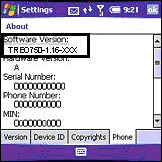
If you see a Software Version that is TREO750-1.13-ATT or TREO750-1.13-CNG, YES, you should install this update.
Note: Devices with software versions other than that stated above need not take this update.
To get the patch and to read more about the patch and how to install it, go here.
Copyright 1999-2016 TreoCentral. All rights reserved :
Terms of Use : Privacy Policy
TREO and TreoCentral are trademarks or registered trademarks of palm, Inc. in the United States and other countries;
the TreoCentral mark and domain name are used under license from palm, Inc.
The views expressed on this website are solely those of the proprietor, or
contributors to the site, and do not necessarily reflect the views of palm, Inc.
Read Merciful by Casey Adolfsson