treocentral.com >>
Products & Reviews >>
Software
Genius!
Overview

Ok, confession time. The people that are closest to me might call me frugal, a good shopper, or elude to me as having a 'nose for bargains,' but the truth is, I'm just plain old-fashioned cheap. I hate buying anything unless I know for sure that I am getting a good, if not the best, deal that I can get. It is truly for people like myself that Genius! was created. Genius! is a software application written for Palm OS devices and is, for lack of better words, an information-go-getter. All of the information that Genius! will help you find is readily available on the internet, but here it is wrapped up in a neat little portal that resides on your smartphone. Sound intriguing? Read on.
Setup
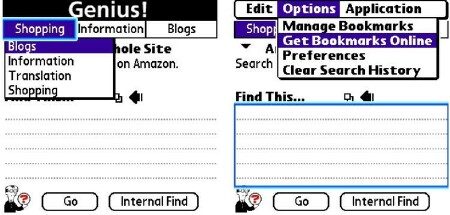
You can download the program and try it for free to see if you'll use it (and I'm pretty sure that you will.) Once you've got it installed on your phone, there's not much that you really have to do. Genius! is ready to fetch information for you. You can, however, reconfigure the three "bookmarks" that are shown across the top of the screen by simply clicking or tapping on them and choosing the bookmark you wish to be displayed (notice, however, that I have downloaded a Blogs bookmark to search popular blog sites.) You'll see that by default there are only three bookmarks loaded into the program - Shopping, Information and Translation. For the average user, these will probably be all that you will ever need. You can (as I did) download other free bookmarks. These bookmarks allow you to search a myriad of different topics (with more being added all of the time.) To get additional bookmarks, simply hit your menu button, navigate to 'Options' and choose 'Get Bookmarks Online.' You'll be directed to Hobbyist Software's page of bookmarks, all of which can be downloaded directly from your Treo or Centro. If you're feeling a little extra saucey, there's even a tutorial on how to create your very own plugin for Genius!
Searching for Information
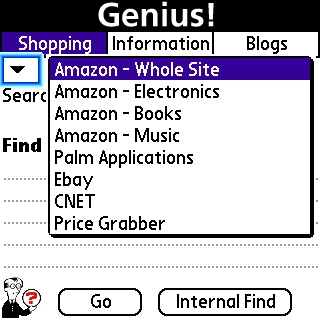
Each section of Genius! is comprised of various different search options. Clicking on the down arrow gives you access to the different areas that you are able to search within - for example, if you want to find out how the prices in a local store might compete with Amazon.com, simply type in the item's model number, choose Amazon.com under the Shopping bookmark, and out come the results in Blazer. Fancy, eh?
The program's built-in default searches are very thorough, even if you never visit the additional bookmark download page mentioned earlier. A quick once-over through the different menu tabs and you've got the basic idea of what you can search for. And since this is not a review of the individual sites that Genius! makes use of (the list is long but here are a few of them: Amazon.com, Ebay, CNET, Price Grabber, Google, Google Local, Google Directions, Wikipedia, etc.) it suffices to say that the interface works well. Over the weekend we were trying to locate a new Japanese Steakhouse but none of us could remember what the name was (well, we had an idea of what it was - but no one could spell it). Being the resident geek, I took the opportunity to try out my new software. A quick navigation to the Information menu, a flick down to Google Local and voila! Sometimes it pays to be the geek (now if I could just figure out how to get girls.) Perhaps I should create a Bookmark to search eHarmony.com...
Internal Find

If there had to be an area that I was not crazy about, it is the Internal Find function - it's not that it works badly, it just wasn't exactly clear where I should type in my search terms. In looking at the layout of the program, I expected to press the Internal Find button and get a little pop up text box. After multiple failed attempts, I admitted defeat. So where do you type in your internal search - under Shopping, Information, Translation...? It turns out that it doesn't really matter - if you're trying to find a PDF file named LastYearsPeachesTally, you can type it in any of the boxes (minus those searches like Google Local with two text boxes, you'll want to type it in the top search box there.) Then click the Internal Find button. Simple? Sure. Annoying until you figure that out? You better believe it.
Conclusion
Genius! as a whole is a very well done piece of software. Though you probably could go through and get all of the info directly from the internet, at $9.95 it is a no-brainer. It has a clean interface and everything is nice and organized - the amount of time that it will save you in setting up the bookmarks in Blazer alone is easily worth the ten bucks. Think of how cool it is to be able to prove that you're always right, anytime, anywhere! Hobbyist Software has a winner on their hands with Genius! Download
the demo and give it a try.
|
|
| Pros |
Small Size - only 61.7KB
Very flexible with plug-in capabilities
Ease of use
|
|
| Cons |
Internal find can be confusing
Most information is available free online
Can become somewhat addictive |
|
|





