
Whether you want a more finger-friendly way to scroll on your WM Treo (think iPhone touchy-feely) or for maximizing your screen real estate, this week's Tip may be what you are looking for. If you are a long-time Windows Mobile power user, this is either old news or a quick reminder. If you are new to the world of WM or just looking for a simple way to customize your WM Treo more to your liking, then read on!
One of the things I like about my WM device is the ability to tweak and customize just about anything. Many of the customization options are available on the front end, like tweaking the "Today" screen or how notifications are seen and heard. However, there is a rich world of tweaking and customization waiting right under the hood of your WM device, but it takes a little know-how and caution so as to avoid damaging the functionality of your device.
The place where customization magic happens is in your device's registry. In order to access and manipulate the registry, you need a Registry Editor, like Resco Explorer. Once you gain access to the registry by running your favorite registry editor, you can change and customize your WM experience.
Today I'm going to focus on editing the size of the horizontal and vertical scrollbars on your WM Treo. In the case of the smallish square screen on the Treo, size DOES matter. If you are like me, I like to squeeze as much out of my screen real estate as possible, and this is a simple, easy way to do that without losing functionality. You can make the scrollbars skinnier by decreasing the numeric value in the registry. Conversely, you can widen the scrollbars for a more finger-friendly scrolling experience so you can leave your stylus in its silo. This can be done by raising the numeric values in the registry. Following is a step-by-step procedure:
- Run your favorite Registry Editor. In this case, I'm using Resco Explorer 2007.
- Scroll down in Resco until you get to Registry Editor and tap it.
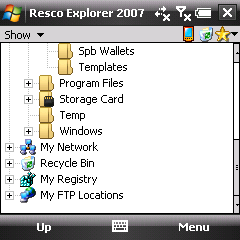
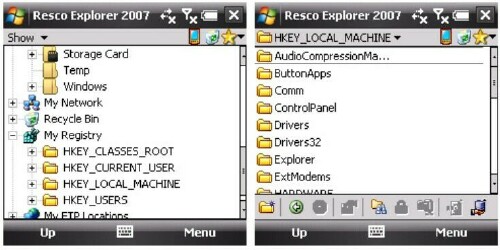
- Tap on HKEY_LOCAL_MACHINE. It's important you choose the right folder. You don't want to change the wrong thing!
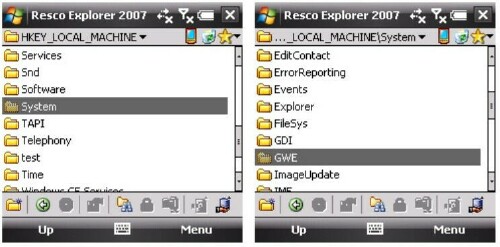
- Tap on SYSTEM
- Open the GWE folder.
- Scroll down and tap on cyHScr=13 (13 is the default height of the horizontal scrollbar). By changing 13 to another number (and ONLY this number), you can increase or decrease the height of the scrollbar. Once you make the change, you will be prompted to save. If you have the value you desire, go ahead and save the change.
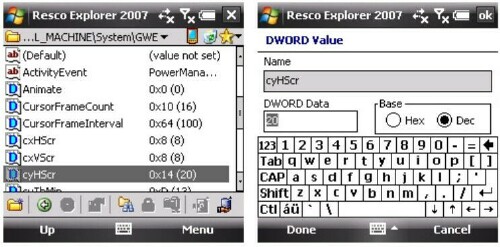
- Now tap on cxVScr=13 (13 also being the default width of the vertical scrollbar). Again, by changing this number to a lesser or greater value, you can increase or decrease the width of the scrollbar. After making the change, you will be prompted to save your changes. Tap "Save".
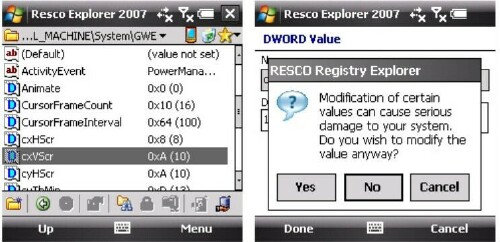
- To make your changes go into effect, you'll now have to soft reset your device. After a soft reset, you'll notice a change in the scrollbars! Repeat these steps until you are satisfied with the height and width of your scrollbars. Wash, rinse, repeat.
A word of caution: as any WM pro will tell you, registry editing is not for the faint of heart and it is important that you never deviate from following the precise instructions that more knowledgeable users may provide for editing your registry. If you aren't careful, you may mistakenly change something that affects the performance and functionality of your device. If you know what you are doing, it isn't scary. Just make sure you follow instructions!
Well, that's this week's Tip. I hope you enjoy this brief foray into registry editing. Tune in next week for another Tip!
Disclaimer: Tip o' the Week makes no guarantee, express or implied, that any tip found herein will be new or particularly useful to the reader (and we do NOT discriminate between skinny and fat scrollbars).





