
Home | Stories | Reviews | TreoCast | Treo Store | Accessories | Software | Discussion | Mobile | About | Search
 
treocentral.com >> Stories >> Commentary
Tip o' the Week: SMS Old-School

Wed Jul 9, 2008 - 3:30 PM EDT - By Brian Hart

Overview

So you have a Palm OS Treo or Centro. Maybe you've been a Treo user from day one and have texted so much that the paint on your keyboard has worn off and your doctor recommends surgery on your thumbs. Whether you are a grizzled veteran of SMS messaging on a Treo or Centro, or a fresh face looking to be schooled, this week's Tip may be right up your alley!

SMS messaging, or "short message service", has reached an amazing level of popularity in the smartphone world. With data plans becoming more affordable and SMS being included in data packages, more and more people are resting their vocal chords and letting their thumbs do the talking. Sending SMS messages, or "texting", can be a great way to send a quick discrete message if you or the other party are not available to talk (i.e., in a meeting, classroom, etc.). It can also be a great way to send information - like a phone number, address, or email - so the receiving party has a "hard copy" on their device to refer to again.

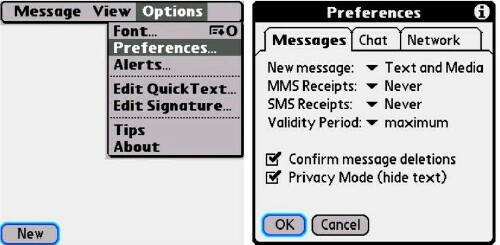
There are a few simple, handy features in your Treo or Centro messaging app that may make your texting experience even better than it is now. What if your Treo or Centro is sitting on your desk at work and you receive a text message of a private nature, like from your spouse or significant other or regarding a doctor appointment? Just like a private or sensitive conversation, there are some things you don't want the world to hear or see. Just press your phone's "menu" button while in the Messaging app, then "options", "preferences", and at the bottom there is a check box for "Privacy Mode (hide text)". If you check this box, then any incoming text message will prompt an alert on your screen rather than displaying the message for the world to see.
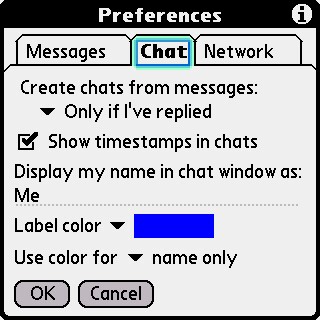
What if you forgot when you had a particular text (chat) session with someone, or you receive a text and don't realize it until much later and want to know when it was sent? There's a quick and easy way to find out when the conversation was held or when you received the text. Again, follow the same step-by-step previously mentioned (in Messaging, hit "menu", "options", "preferences"), then select the "Chat" tab and check the only box on the screen, "Show timestamps in chats." Now you can see when a conversation took place and when you received the unanswered text message.
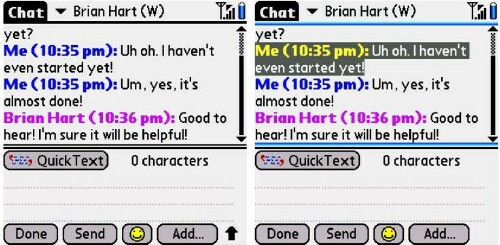
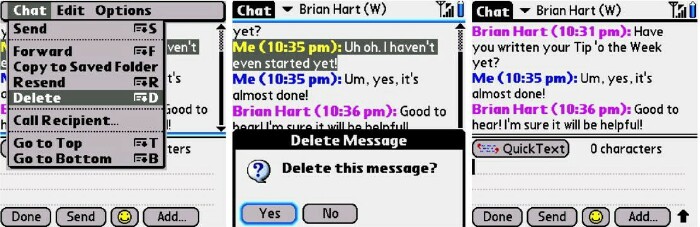
You are having a text chat session and the other party sent you a particularly sensitive text message - maybe it's something really personal or maybe they used some profanity. Maybe some of the information in the conversation is something you need to share with someone else but you don't want the other party to see the more sensitive information or the profanity. Just use your stylus to highlight the part of the chat session that you want to delete, press the "menu" key, and either press "D" or select "Delete" from the drop-down menu. Presto! The unwanted material is vanquished and gone.
That's it for this week's Tip. If you are a developer with some helpful and/or fun software, or if you have a Tip that you wish to pass on to the rest of the community, just email me at: brian.hart@treocentral.com. Tune in next week for another Tip!

Disclaimer: Tip o' the Week makes no guarantee, express or implied, that any tip found herein will be new or particularly useful to the reader (and please please please do NOT use this week's SMS/texting Tip while you are driving your car, flying a plane, operating heavy machinery, etc.).






Treo accessory store
 
References
Actions
> Print this page
> Digg!


Cases

Chargers

Bluetooth

Headsets

Keyboards

Memory
Protectors Cradles
Styli


More Treo Accessories

 Leather Side Case
Palm Side Case
Side-loading leather belt clip case
Just $24.95 BUY

More Side Cases
Stylus (2 Pack)
Palm Stylus (2 Pack) for Treo Pro
Keep extras at home and at the office.
Just $14.95 BUY

More Styli
Treo Screen Protectors  (3-Pack)
Screen Protectors for Treo
Protect your screen!
Just $12.95 BUY

More Screen Protectors
Charger
Palm Charger for Centro, Treo
Charger for your Palm handheld
Just $14.95 BUY

More Wall Chargers
UltraSlim SkinCase
SPE UltraSlim SkinCase for Treo 755p, Treo 750
Half the thickness, better keyboard access
Just $9.95 BUY

More Skin Cases
Leather Zip Case
Palm Leather Zip Case for Pixi

Just $36.95 BUY

More Pocket Pouches
Slip Case
Palm Slip Case for Pixi

Just $27.95 BUY

More Pocket Pouches
H17 Bluetooth Headset
Motorola H17 Bluetooth Headset

Just $89.95 BUY

More Wireless Headsets
Micro-USB Travel Charger, Touchstone Compatible
Seidio Micro-USB Travel Charger,Touchstone Compatible for Palm Pixi, Pre

Just $19.95 BUY

More Wall Chargers
Media Cable for iPod
RedFly Media Cable for iPod for Treo Pro, Treo 800w, Treo 750, Treo 700wx, Treo 700w

Just $29.95 BUY

More Mobile Companion
BackBeat 903 Stereo Bluetooth Headset
Plantronics BackBeat 903 Stereo Bluetooth Headset

Just $89.95 BUY

More Wireless Headsets
Cruiser Bluetooth Car Kit Speakerphone
Jabra Cruiser Bluetooth Car Kit Speakerphone

Just $89.95 BUY

More Speakerphones
HS-500 Bluetooth Headset
BlackBerry HS-500 Bluetooth Headset

Just $69.95 BUY

More Wireless Headsets
 
 
Creating smartphone communities
Android Central - Android reviews, news and forums Crackberry - Blackberry news, reviews and community TiPb - iPhone news, accessory reviews & forums
Pre Central - Palm Pre Review, News and Community Treo Central - Treo & Centro News and Forums WMExperts - Windows Mobile Reviews & News

Copyright 1999-2009 TreoCentral. All rights reserved : Terms of Use : Privacy Policy

TREO and TreoCentral are trademarks or registered trademarks of palm, Inc. in the United States and other countries;
the TreoCentral mark and domain name are used under license from palm, Inc.
The views expressed on this website are solely those of the proprietor, or
contributors to the site, and do not necessarily reflect the views of palm, Inc.

Explore more: The iPhone Blog | WM Experts | Crackberry | CentroSpot | Android Central
Smartphone Accessories: Windows Mobile Accessories | iPhone Accessories | Blackberry Accessories
Fuze Accessories | G1 Accessories | Xperia Accessories | Touch Accessories | Instinct Accessories
Bold Accessories | Blackjack Accessories | HTC Accessories | Centro Accessories | Motorola Q Accessories
Mogul Accessories | Tilt Accessories | Nokia n95 Accessories | Duo Accessories | Verizon XV Accessories
Dash Accessories | Shadow Accessories | Voyager Accessories | Venus Accessories | Touch Accessories
Curve Accessories | Dare Accessories | Venus Accessories | Curve Accessories | Bold Accessories
Omnia Accessories | Incite Accessories | Epix Accessories | Saga Accessories Pre Accessories