Having seen my brother's iPhone, I immediately fell in love with its beautiful interface! Currently using and loving my Centro, I decided to check into finding something similar for my Centro.
There are quite the few launchers available for my Centro, including TreoLauncher, iSpin and ZLauncher to name just a few - but TouchLauncher, by Ryhor Burakou, caught my eye! The download was free at the time, so I grabbed it and fell in love! Read on to find out more!
What Is TouchLauncher?
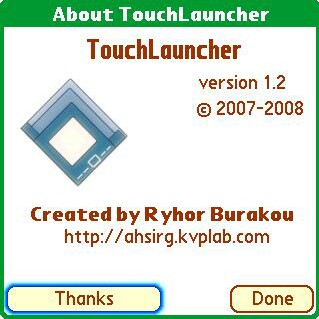
TouchLauncher is a new launcher for Palm OS 5. It sports a beautiful user interface and combines basic launcher features with new ideas! TouchLauncher can be used to run applications on your device with your fingers, as well as perform other basic tasks with them.
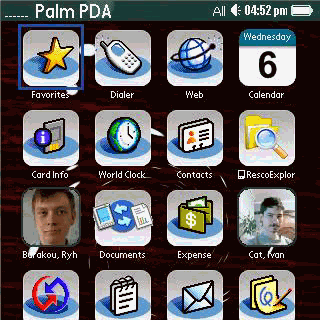
The author, Ryhor Burakou, wants to stress that TouchLauncher IS NOT an iPhone or any other device emulator. It is not in any way affiliated with Apple or any other company. It does not try to mimic any interface and/or functions. Lastly, he asks that you please accept and love TL as it is.
Initial Setup/Launching with a Touch! (and more)
Setting up TouchLauncher was a breeze; I simply downloaded the installation file from the TreoCentral Store and installed via HotSync. Once installed, you can easily customize TouchLauncher from top to bottom, literally - a few examples of which I'll touch on later.
Using TouchLauncher is as easy as touching your device's screen. From within TouchLauncher you can launch an application, rearrange application icons(only in the All category), delete an application and associated icon, change between pages, rename an application, and even beam an application - to name just a few of the many functions available.
What Sets TouchLauncher Apart?
Sure, many of these features are also available in the aforementioned launchers above, but TouchLauncher takes it to the next level. TouchLauncher adds the ability to customize your background/wallpaper, use larger font for icon text, use custom icons, rename icons to your liking and even remove the icon names altogether - to name a few of the many available customizations. Let's take a more detailed look at some of these features.
TouchLauncher Features
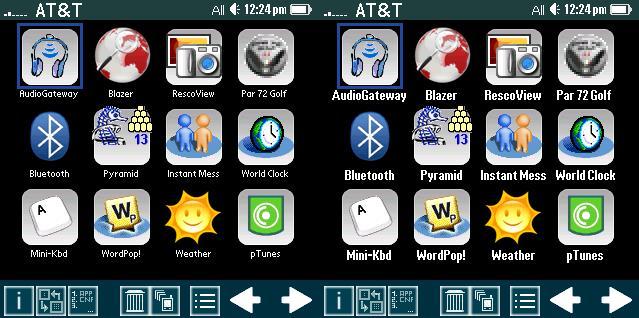
TouchLauncher is feature-rich to be sure. At the top left is a signal meter and the name of my cell service provider, AT&T. At the top right we find the category, time and battery meter. Clicking on the battery meter will alternate the mode the meter is displayed in, either in full/empty or battery percentage.
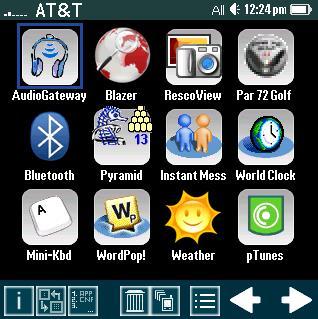
The bottom toolbar (also seen above) offers many functions as well. Clicking on the "i" at the bottom left displays device-specific information (see below). Next, we find the rearrange icons symbol, which just reminds you that you can tap and drag icons to rearrange them. This is followed by the Manage Applications symbol which allows you to add, edit or remove individual applications, which includes the ability to use custom icons. The trash can symbol allows you to drag an application icon to the trash can, which gives you the option to delete the application from your PDA, although you cannot remove TouchLauncher application from within TouchLauncher. To beam an application you can simply drag the icon and drop it on the beam icon next to the trash can. The next symbol is the category symbol which allows you to change the category from All to Games, etc. Tip: This menu can also be brought up by hitting the space bar. Finally, at the far right are the right and left arrows with which you can move between pages by clicking right or left. You can also move an icon to the prior or next page by dragging the icon to the left or right arrow respectively - nice!
Navigating the Menus
TouchLauncher offers access to many of its functions with its menus. From the Items menu you can rearrange your icons, manage your applications by choosing custom icons, creating custom names for your icons, etc. and categorize your applications into the category of your liking.
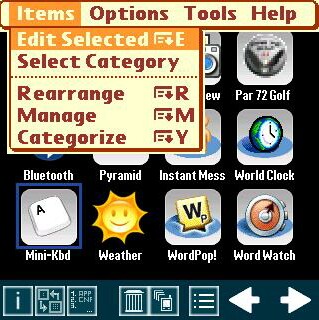
From the Options menu you can choose a custom wallpaper or remove the current wallpaper. You can also rescan memory, which may give you the option to add new applications to TouchLauncher. Here, you can also choose the Preferences menu which offers you several ways to fine-tune the look and feel of TouchLauncher to fit your needs. These include hiding the bottom toolbar, which I like to do to make the program look a bit cleaner. You can also hide the icon names to clean up the interface even more. You can also disable category switching animation, use larger fonts and a few other handy tweaks you will likely find useful.
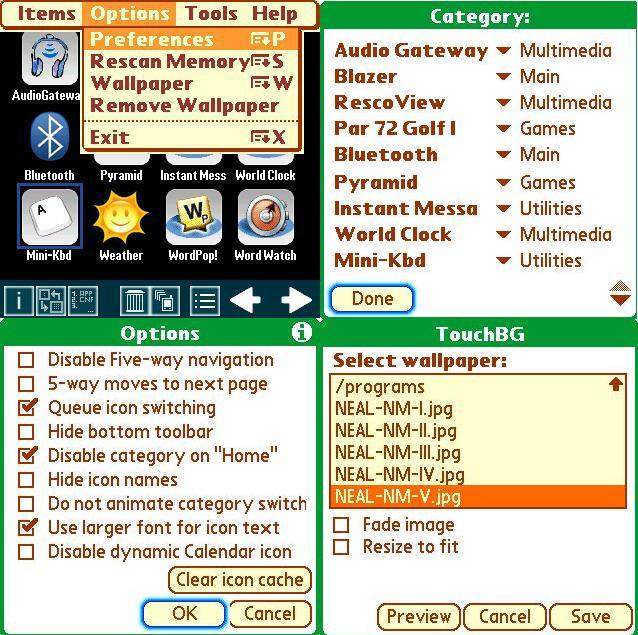
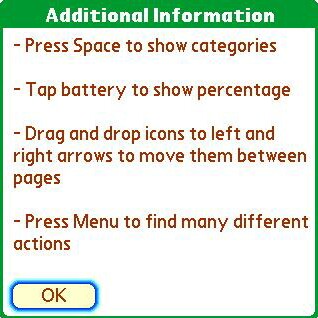
There is also a Help menu from which you can register TouchLauncher and read a few tips about using TouchLauncher.
My Experience With TouchLauncher
Ok, now that I've pointed out some of the great features of TouchLauncher, I'll share with you my own take of this great program!
First off, I love the default look of TouchLauncher and would love it 'as is' if I couldn't change a thing! But, it gets better. The awesome black wallpaper can be changed to whatever you desire, which opens up a world of possibilities, doesn't it? Forum member glt9007 offered his help personalizing wallpapers, so I took him up on it and am very pleased with the wallpapers he sent me! I'm also using a mixture of his icon sets, which are available, along with other users icon sets, at the TouchLauncher Iconsets page. These icon sets are possible because the author offers an IconPack Creation Kit with Tutorial on his page. It's inspiring to see how people are creating (and sharing) their own icon sets!
I love the ability to rename an icon to whatever I want, as opposed to the somewhat archaic names Palm lends to them. I find myself renaming my icons a lot, in fact, hehe.
I also employ the option to use larger font for icon text, as my eyesight leaves a lot to be desired - even with corrective lenses. I really appreciate this feature, as it makes a HUGE difference to me, no pun intended, grin.
I like the dynamic calendar icon, which displays the current date, as opposed to a simple representation of a calendar found in the original Palm launcher. There is also a dynamic SMS message counter, which shows the number of unread SMS messages. Dynamic meaning that the date displayed changes as the date itself changes and the number of unread SMS messages displayed changes as you receive new messages. Nice!
I also like the ability to add Web links to TouchLauncher. The first I added, of course, was a link to TreoCentral. I can simply click the icon I chose to represent Blazer, a globe, and my favorite Web site is loaded! This is handy, as it saves time by eliminating the need to run Blazer and then navigating to the page.
I should mention that I have experienced a slight delay when I click an icon to launch a program, but I like the way it's done. The page is cleared from right to left as the page fills to white, then the application seems to be wheeled into its place. A bit annoying though is what happens when I hit the home key to return to TouchLauncher. It returns to the original Palm launcher, and then to TouchLauncher, which can take (on my device) just under one second. Nothing major, just pointing this out in fairness.
Also, to exit TouchLauncher you must bring up the menu screen, choose Options, then choose Exit or hit the menu key and then X. If my memory serves me correctly, this is the same way that you have to exit Zlauncher. I'd like to see a symbol I could simply click on to exit TouchLauncher. Perhaps Ryhor will include this in an update.
Conclusion
As I said, I could be happy with TouchLauncher even if I couldn't customize it to the way "I" want it - but, I look forward to any improvements Ryhor makes to the application! For the price of $6.99, you can hardly go wrong - so buy this awesome program and see for yourself! At the moment, TouchLauncher is listed as the #1 Best seller in the TreoCentral Store in Palm OS software.
|
|
| Pros |
Beautiful eye candy
Highly customizable
Multi-functional
Scan and add applications
|
|
| Cons |
Slightly laggy at times
Immediate exit would be a plus
Seems to fight for default launcher ability |
|





