I'm still learning about my Kindle 2 since I just got it yesterday. I just now read that you can transfer MP3 files to your Kindle to play as background music while you're reading. You can do this quickly and easily via the USB cable by connecting it to your computer. I had noticed when opening the box that the cable had a USB connector connected to the power adapter.
The Kindle's screen reflects light like ordinary paper and doesn't use a backlight. So, unlike reading with a smartphone, you'll need a lamp or some other kind of light if you're going to be doing any bedtime reading. At first I thought of that as a negative, but the way the screen is on the Kindle with its electronic-ink display technology, the glare associated with other electronic displays like your computer screen, is eliminated.
I don't really understand electronic ink technology, but in Amazon's Kindle description, it states:
Utilizing the latest in electronic-ink display technology, Kindle provides a crisp black-and-white 6" screen with the same appearance and readability of printed paper...
The screen works using ink, just like books and newspapers, but displays the ink particles electronically. And unlike a laptop or smart phone, Kindle never gets warm so you can comfortably read as long as you like.
I turned off the Kindle a couple of times today while it was in sleep-mode and the screensaver picture disappeared, but I noticed that there was a faint ghost of the picture left behind on the screen. I first noticed the ghost image after the Mark Twain portrait disappeared when I turned off the Kindle.
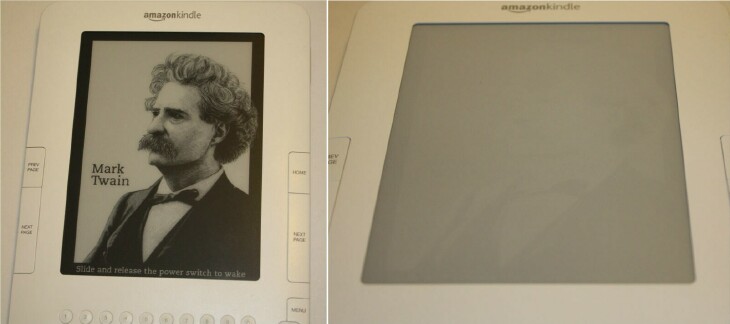
Above is a photo of the portrait and one I took after it happened. I went over to the Amazon Kindle forums and read some threads from Kindle owners who have had the same thing happen to them. According to some of them, customer service told them that this is normal. The ghost image did go away after I turned the device back on, so I'm not very worried about it. I figure it's just a "kink in the ink" technology. I can live with it as long as the ghost images do always go completely away.
While reading through some of the various threads, I also learned that the first Kindle had a user replaceable battery, which the Kindle 2 does not. Also, the first Kindle had an SD card slot, which the latest Kindle also doesn't have. And I read that some people don't like the keyboard as well as the original Kindle's keyboard. I really have no complaints with the Kindle 2 keyboard so far, but I can't actually compare since I don't have an original Kindle. It's possible that I would prefer the other Kindle's keyboard. I've had no problems typing on it. I hold it with both hands and type with my thumbs, or if the Kindle is lying on a table or my lap, I just use the tip of my index finger.
I haven't looked at any newspapers or magazines yet on the Kindle, but I read in Amazon's description of the device that images and photos display crisply on the Kindle and can be zoomed to full size of the screen. I can't wait to try that out.
One of the nice features of the Kindle is its built-in New Oxford American Dictionary that has over 250,000 entries and definitions. If you come across a word you don't know while you're reading, just move the cursor right in front of the word and the definition will automatically display at the bottom of the screen. I love having a built-in dictionary! I remember having one built-in on my Palm TX, or was it the Tungsten E2? Anyway, it was a great feature as I'm always looking up something. When I'm on my computer, I'm a big Google user and also have the Merriam-Webster Online dictionary bookmarked.
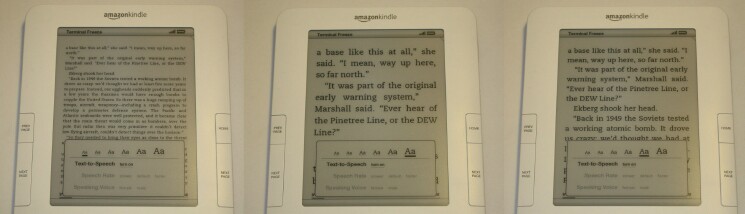
Just like on the Centro and iPhone 3G, you can change the text size on the Kindle 2. To do this, just press the Text key, the key to the right of the space bar, and move the 5-way controller to choose the size you prefer and press the 5-way to select. There are six sizes to choose from. So far, I'm comfortable with the third from the largest text size. I'm sure I could read on the small size but I'd need to put on my reading glasses because my left eye is blurrier with the contacts in. Thank goodness we have six different choices!
I'm really impressed with the Kindle 2 so far. I love that it's so lightweight and easy to hold. It doesn't take much pressure at all to press the buttons, and turning the page is easy. I like the 5-way controller as it seems Treo/Centro-like and very familiar. I love the way the ink looks on the screen. It really does look just like you're reading in a book or in a newspaper. And it's easy on your eyes.
I appreciate that the Kindle doesn't get hot when it's on. It never gets hot and is always cool to the touch. Too bad I can't say the same for my laptops. Both get so hot that I can't stand it.
I also appreciate that you can use your Kindle right out of the box. There's no setup and you don't need your computer. Just plug it in and you're set to begin reading.
Did I mention battery life? No? You can read on a single charge for up to 4 days with the wireless radio turned on. With the wireless turned off, you can read for up to 2 WEEKS! Not bad!
I love being able to browse soooooo many books! The Kindle Store currently has more than 240,000 titles, and they are adding more every day. Amazon notes that New York Times Best Sellers and most new releases are $9.99 unless marked otherwise. I did see a few during my browsing that were like $11.00. At first I was thinking that the $9.99 price was sort of high considering I'd just forked out $360 for the Kindle itself. But after looking around on some other eBook sites, I'm not too bothered with $9.99.
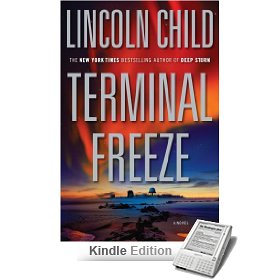
For example, my very first Kindle book purchase was "Terminal Freeze", by Lincoln Child, who is one of my favorite authors. I paid $9.99 for my Kindle edition of the book. Well, over at my favorite eBook site Fictionwise, the same book is $24.95! So I'm not complaining. I didn't have to go sign in on a site to get my book either. I simply went to Menu on my Kindle 2, then chose "Shop in Kindle Store" with the 5-way controller, and typed in Lincoln Child on my QWERTY keyboard. When I saw the book I wanted, I chose "Buy" and it automatically began to download to my Kindle device. I didn't have to go through a checkout procedure and then download the file and then sync that to my device from my computer's desktop. It was all very simple and very fast. Nothing against Fictionwise or any of the other eBook sites; the Kindle is just another way for me to buy and read eBooks. I'll still continue to buy books for my Palm smartphones and my iPhone.
I'll also still continue to read real paper books. Nothing can actually replace real books for me, but I do like having different choices of reading options. I love the feel and the smell of real books. I love seeing them all lined up on my many bookshelves. I love going to a bookshelf and searching for the book that I want and running my fingers along the spine of each book. I love finding bookmarks for my books too. I've used all kinds of stuff for bookmarks, from tie twists to a piece of napkin to handmade bookmarks. And sometimes I even just bend the top corner of the page to bookmark it. Original, huh?
Of course one of my favorite features of the Kindle 2 is its ability to hold more than 1,500 books. Just like with the Centro and iPhone, you can carry your entire library with you on a very small device. That is just awesome! It's a chore to carry an armful of real books. I do NOT miss my elementary school days of carrying all those books home everyday. We didn't have backpacks to haul our stuff around in like the kids do now. We lugged them around in our arms. It was really fun standing on a packed full school bus when every seat was taken, holding onto the back of a seat and trying to balance my books and clarinet case at the same time. Ugh! I was soooo happy when I was able to drive myself to school in high school. Gosh, I love my reading gadgets! A mobile library is so much fun. Whip it out while waiting in a boring doctor's office, which I'll be doing tomorrow morning (Friday). I'll be reading in my Kindle tonight too while I'm battling it out with ole Insomnia.
If you've ever been interested in getting an eReader type of device, I can definitely recommend the Kindle 2. It's not the cheapest gadget, but it does have a lot of features, and don't forget that 3G Sprint radio inside. If you want an eReader that is thin, lightweight, fast, looks great, has a built-in dictionary and a battery saving sleep-mode with some cool portraits, the Kindle 2 from Amazon is a great choice.
And if you don't care about those eReaders like the Kindle and the Sony device, just stick with your Treo or Centro. Those are great little eBook readers! And we know all the other great stuff you can do on them like talking on the phone, texting, writing documents, listening to music, taking photos, surfing the internet on decent looking web browsers, playing games, etc. My Centro and Treo Pro will be staying right by my side, Kindle or no Kindle.





