Home | Stories | Reviews | TreoCast | Treo Store | Accessories | Software | Discussion | Mobile | About | Search
 
treocentral.com >> Stories >> Guides
Using del.icio.us on your Treo

Mon Jul 17, 2006 - 1:48 PM EDT - By Dieter Bohn

Introduction

I love del.icio.us. I use it on my desktop almost to the complete exclusion of local bookmarks. For those of you not in the know, del.icio.us is a social bookmarking site that has four killer features:

  • it loads fast and isn't ad or text-heavy
  • there are lots of ways to post your bookmarks
  • you can share your bookmarks and see other people's bookmarks
  • bookmarks are 'tagged' so you can easily find them later.

Now, there are plenty of sites that aggregate various links to Treo-friendly sites available. Recently, I got to thinking about how much I love del.icio.us on the desktop. There's this great website that loads quickly, stores my bookmarks, is easy to navigate, and lets me find other people's stuff? Seems like a good fit for the Treo to me, but is it?

This article will briefly discussion using del.icio.us on your desktop, then see if we can't get together as Treocentral users and readers to make ourselves a great link archive, and finally give some tips for speeding up del.icio.us on your Treo.

Using del.icio.us on your desktop
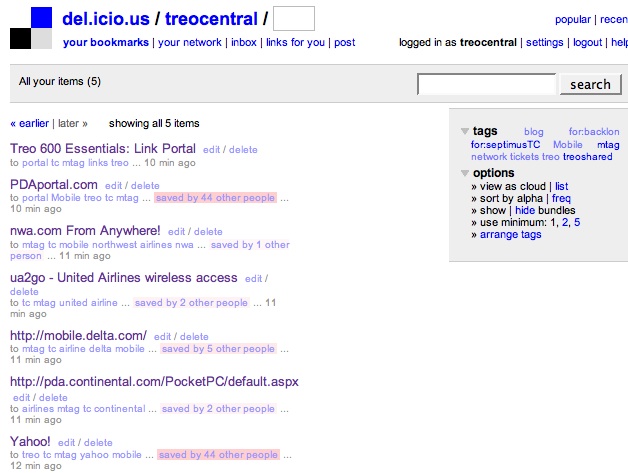
The first thing to do is make an account. Once there, you can, if you like, do a big batch upload of all your locally stored bookmarks into del.icio.us by clicking "settings" in the upper-right-hand corner and then "import." The instructions there are pretty straightforward.

After you've uploaded your bookmarks, how do you bookmark new pages? That's easy too, there are buttons that you just add to your bookmarks bar. If you're using Firefox, then there's a great extension that you can also install.

The key, though is using tags. Tags are great for two reasons:

  • You can put stuff in multiple categories very quickly
  • You can find stuff that other people have tagged the same way.

The possibilities are really endless. For example, every day I take a look at the del.icio.us page for bookmarks that have been tagged treo. You can go to any del.icio.us tag page just by typing http://del.icio.us/tag/ENTERYOURTAGHERE. More information on how that works here. You can also enter multiple tags with the symbol in between them.

The upshot of all this is this: When I'm browsing the web and I come across a site that I want to look at on my Treo, I just bookmark it and tag it 'mtag.' Then I can go to http://del.icio.us/MYUSERNAME/mtag to find it on my Treo later!

Lastly, if you use an RSS reader (like mRSS on the Treo or a desktop client like Firefox), every bookmarks page on del.icio.us has an automatically updated feed.


Next Page: Social Networking? Social Treoworking >>



Treo accessory store
 
References
Links
> Treocentral del.icio.us page
> Del.icio.us homepage
> Mobilicio.us Webpage
> Skweezer.net
Actions
> Print this page
> Digg!


Cases

Chargers

Bluetooth

Headsets

Keyboards

Memory
Protectors Cradles
Styli


More Treo Accessories

 Hybrid Headset/Headphones
Palm Hybrid Headset for Centro, Treo
Consolidate into one.
Just $4.95 BUY

More Stereo Headsets
1150 mAh Battery
Palm 1150 mAh Battery for Centro, Treo 800w
More talk time!
Just $14.95 BUY

More Batteries
 Leather Side Case
Palm Side Case
Side-loading leather belt clip case
Just $24.95 BUY

More Side Cases
Pen Stylus  (3-Pack)
SPE Pen Stylus for Treo 755p, Treo 750
Pen and Stylus in one! (3-Pack)
Just $14.95 BUY

More Styli
1800mAh Battery
Palm 1800mAh Battery for Treo 700p, 700w|wx, 650
Always stay powered
Just $24.95 BUY

More Batteries
Screen Protectors (3-Pack)
SPE Screen Protectors (3-Pack) for Palm Pre Plus

Just $12.95 BUY

More Screen Protectors
Protective Skin
BodyGuardz Protective Skin for Palm Pre Plus

Just $24.95 BUY

More Body Skins
Ultra Slim Pocket Pouch
SPE Ultra Slim Pocket Pouch for Palm Pixi Plus, Pixi

Just $19.95 BUY

More Pocket Pouches
Micro USB Data Cable
Motorola Micro USB Data Cable for Palm Pixi Plus, Pre Plus, Pixi, Pre / Treo Pro, Treo 800w

Just $14.95 BUY

More Sync & Charge Solutions
Side Case
SPE Side Case for Palm Pixi Plus, Pixi

Just $24.95 BUY

More Side Cases
Top Case
SPE Top Case for Palm Pixi Plus, Pixi

Just $24.95 BUY

More Top Cases
Classic Hybrid Charger
Solio Classic Hybrid Charger for Palm Pixi Plus, Pre Plus, Pixi, Pre / Treo Pro, Treo 800w

Just $99.95 BUY

More Solar & Emergency Chargers
Cabriolet Multidapt Leather Case
Krusell Cabriolet Multidapt Leather Case for Palm Pixi

Just $24.95 BUY

More Leather Cases
 
 
Creating smartphone communities
Android Central - Android reviews, news and forums Crackberry - Blackberry news, reviews and community TiPb - iPhone news, accessory reviews & forums
Pre Central - Palm Pre Review, News and Community Treo Central - Treo & Centro News and Forums WMExperts - Windows Mobile Reviews & News

Copyright 1999-2010 TreoCentral. All rights reserved : Terms of Use : Privacy Policy

TREO and TreoCentral are trademarks or registered trademarks of palm, Inc. in the United States and other countries;
the TreoCentral mark and domain name are used under license from palm, Inc.
The views expressed on this website are solely those of the proprietor, or
contributors to the site, and do not necessarily reflect the views of palm, Inc.

Explore more: The iPhone Blog | WM Experts | Crackberry | CentroSpot | Android Central
Smartphone Accessories: Windows Mobile Accessories | iPhone Accessories | Blackberry Accessories
Fuze Accessories | G1 Accessories | Xperia Accessories | Touch Accessories | Instinct Accessories
Bold Accessories | Blackjack Accessories | HTC Accessories | Centro Accessories | Motorola Q Accessories
Mogul Accessories | Tilt Accessories | Nokia n95 Accessories | Duo Accessories | Verizon XV Accessories
Dash Accessories | Shadow Accessories | Voyager Accessories | Venus Accessories | Touch Accessories
Curve Accessories | Dare Accessories | Venus Accessories | Curve Accessories | Bold Accessories
Omnia Accessories | Incite Accessories | Epix Accessories | Saga Accessories Pre Accessories


