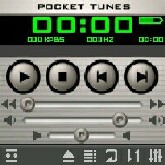
Many Palm users donÂ’t want to switch to Windows Mobile because theyÂ’ll have to leave behind their favorite applications. StyleTap promises to emulate the Palm OS on Windows Mobile Devices so you can have it all. Right now IÂ’m listening to The Doors on my Palm Treo 750v courtesy of Pocket Tunes. StyleTap is just out of Beta with version 1.0 and there a few issues to be sorted out as not all Palm programs will run. Unfortunately, because StyleTap is an emulator, it is quite possible that your favorite applications may never run properly.
Setup
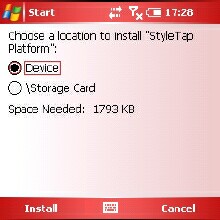
The StyleTap installer is quick and easy to run. Once youÂ’ve downloaded the application, click on the file and it will install to the device over ActiveSync. YouÂ’ll need to accept the .cab file on your device. The final step is to associate .prc and .pdb files on the desktop with StyleTap so when you double click on them they will automatically pull up the StyleTap conduit. Conveniently, the StyleTap setup makes this a simple one click operation. Or, for those on the run, grab the .cab file directly from the StyleTap website.
The StyleTap conduit is simplicity. Once you’ve clicked on a Palm application or database file, the large box asks you to “Install all to Device” and the applications fly over the Sync cable. On the device side, the applications are available both in the main Windows Mobile Programs folder and within the StyleTap application launcher. Using File Explorer, you can move the applications out of the Programs Folder if it gets too cluttered.
Running with StyleTap
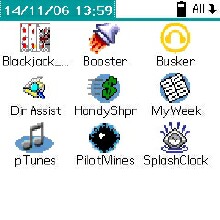
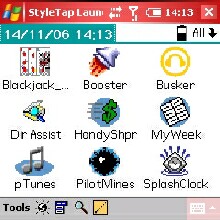
On the device, click StyleTap Launcher and you are presented with the quaint Palm OS style screen. You can either choose to see Pixels at 1 to 1 ratio (creating a small window 66% of full size within the screen) or scale the display to 100% to fit the screen. The latter is the default and usually your best bet. Unfortunately, programs that rely heavily on graphics may not scale well. My Pocket Tunes skin looked pretty atrocious.
The right action button or a tap on the top of the program screen drop menus down. The StyleTap launcher itself has a menu that includes Application Tools and Options. Application tools allow you to Delete or Beam applications. Note that there is inconsistent five way support in StyleTap, so youÂ’ll be putting the stylus to good use.
The options menu allows users to change color bit depth, emulated display size, and importantly, User Name. Many registered applications are keyed directly to the device User Name; StyleTap permits the device owner to set the user name and allows it to be changed just once every 24 hours.
The left action button brings up a StyleTap tool bar. You have 6 actions – you can check or uncheck ‘Fast Screen Update’, return to the main StyleTap launcher by clicking the small ‘s’, drop down the menus, Find, input a graffiti stroke, or bring up the keyboard.
Functionality: The program
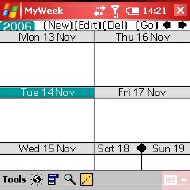
The key to StyleTap, is, of course, its ability to run Palm programs under Windows Mobile. At the start of this review, I mentioned that I was using Pocket Tunes. I can run Pocket Tunes 3.06, but not a more recent version. The program also doesnÂ’t support HotSync, so any program that relies on it is out of luck. Although I can install and seamlessly run DateBk, WeekView, or MyWeek, these applications cannot connect with my Outlook calendar database, diminishing usability. According to the readme file, StyleTap does not support any system Hacks or Bluetooth either.


Two games I have, Black Jack and Hold Em High seem to work flawlessly. Splash Clock is fine too and it should be noted that StyleTap includes such “essential” apps as Handy Shopper and Pilot Mines, though I did find the directory assistant useful. One thing that strikes me as odd is that the StyleTap folks have gone to a lot of trouble getting Documents to Go to work smoothly. Although Docs to Go is an excellent suite of applications, the Windows Mobile equivalents are included with all devices.
As I made clear in my review of the Treo 750v, I think the Palm OS is a dying platform and only a few diehards would argue. There are rumors that Palm itself is working on a new OS, while others hope that Access, who purchased PalmSource, can resuscitate the OS though that seems increasingly unlikely as handheld and smartphone makers move to the Windows Mobile platform.
The makers of StyleTap make it clear that they hope Palm developers will adapt their programs to run smoothly with the application. However, if I were a developer I would put all of my energies into new Windows Mobile programs rather than into work for a tiny percentage of users who both use a Palm program AND want it to work under Windows Mobile AND cannot find a Windows Mobile equivalent.
The StyleTap website has two lists of compatible applications. The list of tested compatible applications can be found here and user reported compatible applications are listed here.
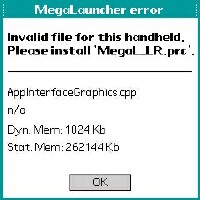
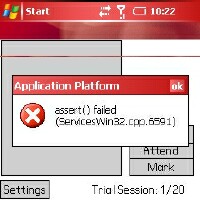
I have noticed that is very easy to get error messages with incompatible applications. Perhaps subsequent versions will support many more programs, but by then it will likely be too late.
Next Page: Conclusion >>





