|
|
|
| Thu Aug 18, 2005 - 2:14 PM EDT - By James Hromadka | |
|
|
|
|
| Classic
King James New King James Latin Vulgate Weymoth New Testament Translation American Standard International Standard God's Word World English |
1910 Louis Segond (French) 1912 Luther (German) 1909 Reina-Valera (Spanish) John Darby's New Translation Modern King James Young's Literal Translation Douay-Rheims Literal International Translation |
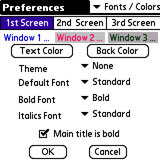 When you insert the SD card, the application name is BibleR (hereafter BibleReader), which is licensed from Olive Tree Software. The default color scheme is a little garish for my tastes, so the first thing you will probably do is make a trip to Options | Preferences | Fonts/Colors. I went with blue text on a white background, but with a 256-color palette to choose from, there are plenty of options.
 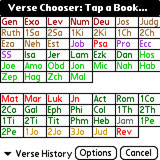 When reading the Bible, you can switch among translations by tapping the translation name in the titlebar or going into Tools | List of Bibles. Switch books of the Bible by tapping the book/verse or going into Tools | Verse Chooser. The books of the Bible are color-coded, and unfortunately you must tap on a book instead of selecting with the navigator buttons. You can either go directly to the chosen book of the Bible or specify the chapter and verse, which is handy when you want to read a quick passage that the Pastor mentions during a sermon.
| Shortname | Bible |
| Asv | American Standard Version |
| BibleR351e015.prc | Not used (application file) |
| BibleReaderHelp | Help file |
| French1910LSg | 1910 Louis Segond (French) |
| German1912Lut | 1912 Luther (German) |
| GodsWord | God's Word |
| ISV | International Standard Version |
| Kjv | King James Version |
| Nkjv | New King James Version |
| SpanishRV09 | 1909 Reina-Valera (Spanish) |
| Vulgate | Latin Vulgate |
| Web | World English Bible |
| Wey | Weymouth New Testament |
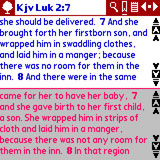 I didn't think the splitscreen feature would be that useful, but it is great for getting a better understanding of a particular verse. The default is two windows, but you can have three different translations on screen at once. As you read the Bible, the second window changes with you. As my church normally uses the King James Version, I use that as my main Bible, but if I am reading and find a verse that is difficult to understand, I press W to bring up a different translation and read what I need, then press W again to go back to single-window mode.
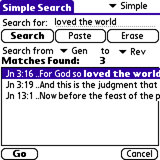 Searching can be as easy or as advanced as you want. There are three search modes (Basic/Simple/Advanced), and all of them let you specify which books of the Bible to search. If you know the exact passage, a Simple search is best, while a Basic search is useful if you are looking for any of the specified words. It doesn't take too long to search either. Searching for "loved the world" in the entire Bible took about 25 seconds to complete. Bookmarking is also a nice feature.
Copyright 1999-2016 TreoCentral. All rights reserved :
Terms of Use : Privacy Policy
TREO and TreoCentral are trademarks or registered trademarks of palm, Inc. in the United States and other countries;
the TreoCentral mark and domain name are used under license from palm, Inc.
The views expressed on this website are solely those of the proprietor, or
contributors to the site, and do not necessarily reflect the views of palm, Inc.
Read Merciful by Casey Adolfsson