Youre driving merrily down the street when disaster strikes. Your Treo! Its back at the café on the table. Safe bet it wont be there long. Ah, but some considerate stranger will return your treasure. Right?
Ill spare you the rest of this scary scenario, but contemplate for a moment the consequences such an episode could wreak on your otherwise uncomplicated (or not) life, on your "identity," your family, and your friends identity, even. In the Treo are phone numbers for spouse, children, friends, siblings, parental units, co-workers. Your boss? Any of those that youre on speaking terms with. Or all of the above.
Actually, theres an 80-percent chance your Treo will fall into friendly hands, but for that other 20 percent, it gets even scarier. All those street addresses, plus cell phone numbers, birthdays, and plenty of other information that youd rather not fall into grubby hands.
I grew up in a town so small my bicycle didnt need a lock. My family left doors unlatched while out visiting, in case relatives or friends came by. We had one plain black telephone, and cell phones hadnt been invented, although we pined for them while walking the pet dinosaurs, dodging those pterydactyls flying around. Back then, if we lost an address book, or even a checkbook, someone would return it.
Unless youve refreshed your time machines dilithium crystals lately, those times are gone. Misplace your Treo - that electronic address book that also contains your journal, your schedule, your medical information, and your familys sensitive data and your very identity is at risk of, well, you dont want to know.
Not being a corporate kind of guy, I dont keep trade secrets or company gossip in my Treo. If you do, your companys data are also at risk. Lately, the headlines blare horror stories of lost laptops containing vast information. Maybe we dont hear about lost PDAs because theyre easier to secure.
And Treos are easy to secure. Call your cell company to report a lost or stolen Treo, and itll be offline before you hang up. But what about your data? And the information on that gigabyte-or-more SD Card in it? Corsofts Warden Security for PalmOS and Windows Mobile Treos aims to fill that void.
Features
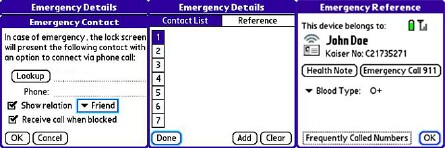
Think about all the things youd like a security system to implement, and Corsofts Warden is probably already there, and then some. The programs options for securing your Treos data, even destroying it, cover a mind-boggling list of possibilities. The program even permits some types of calls, incoming or outgoing, to allow finders to contact only you, and to keep you accessible while your Treo isnt. The programs "in case of emergency" features permit calls from/to your family or up to seven people you designate.
When setting up the security system, you get to choose from extensive menus that will lock the Treo:
When you tell it to
When the phone powers off
When the phone is out of your carriers coverage area
When an SD card is removed
When the Treo screen is powered off
After a period of disuse
At any preset time of day or night
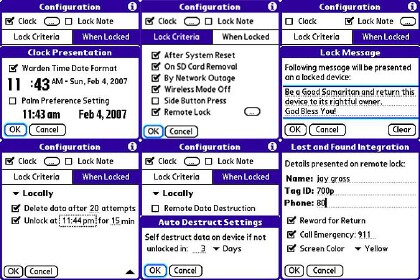
The more paranoid you are, and the more sensitive your Treos data, the more of these you should use. In addition, you can secure the device remotely after its loss, for example. You accomplish this by browsing to the companys website, LockMyTreo.com, and supplying the password and some other information. You can also simply send your lost Treo a specially formatted SMS (containing the lock password) from any other cell phone. The companys web system is supposed to be more reliable than SMSing the lock yourself, and you wont have to remember the arcane syntax.
When your Treo locks, its data is locked, and so is the phone though the program allows setting up some exceptions to handle a variety of possible scenarios. Exceptions notwithstanding, theres no getting past the lock without the password, regardless of soft or warm resets. I know this because (face reddening) I forgot my Treo 700ps Warden password and could NOT get in, no matter what I tried. And I did try.
As you might already know, Treos have a hierarchy of reset options, including pushing the reset button, removing the battery, and the all-gone factory reset for use if your phone changes hands. Warden traps all those but the last, and comes back mean as ever, demanding your password before it lets you in.
A factory reset destroys all data, as well as Warden, but it does restore the Treo to usability the same as it was when you first took it out of the box. If your data is backed up (as mine is!), you can restore it. This time I used a simpler password so I can remember (and type) it easier.
More Features
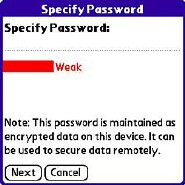
Warden grades your password as you set it up. This is what got me. A few characters rates "weak" for security. Too guessable. Add some punctuation, some numbers maybe, and youre up to good-better-best. Hard to remember, though. A password is secure only if it stays in your brains memory banks, so you dont write it down, and when your brain remembers it wrong, as mine did, its off to Treo factory reset with you.
Besides keying in an elaborate (or not) password, Warden allows quick access by pressing a sequence of the Treos specialized buttons, the ones above the QWERTYs. Nice feature, but I forgot that too. I didnt need it for a few weeks, and it got buried in the grey matter.
In use, Warden can be configured to "park" unobtrusively, or keep your Treo as private as youre willing to put up with. I chose to keep it unobtrusive, so I wouldnt need to keep re-entering the elaborate password I set up.
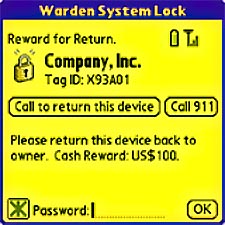
Besides locking the Treo against use, Warden can erase all data, including any SD card it contains. It can do this automatically or when its secured remotely. While the device is locked, any calls that come in are automatically sent to voicemail. However, you can choose to allow the finder (or pawn shop) to call you, only you. The owners identity can be obscured with a "Lost and Found" option, so the finder wont know who you are. The screen will turn a special color, and it can display a reward or other message if you want. The finder can call only you (or whomever you choose), but you can set it up to allow your spouse or other people to call in.
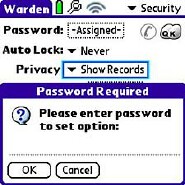
As I found out to my dismay, theres not much hope for a lost password. The company does not store them on its website, and therefore cant accommodate your "oops" request. If you forget the password, as I did, the only solution is a hard reset. After that, youll have complete control of your Treo, but everything in it programs, music, calendar, and contacts is gone forever. You can, however, restore these from your backup or by HotSync with your computer. Resetting the Treo does not erase the SD card in it.
Native Treo Security
Out of the box, Treos come with a "Security" application (press Apps and tap the Security icon) that lets you choose a password and when or whether to lock the Treo. You can choose "On power off", "At a preset time" or "After a preset delay." These options are not available until you assign a password. In addition, you can choose whether database "records" that are labeled as private will show without the password being entered. Sounds fine, but theres a big mean bug in it for Treo 700ps and 680s. Palm has deigned to fix the bug. Warden bypasses the systems system, so the bug isnt an issue.
Next Page: Conclusion >>





